


Browse sections
Verify visitor identity
Tell website chat who your signed-in customers are, safely, so nobody can pose as someone else.
On this page
If customers sign in to your website, you can pass their name and email to website chat, so your team knows who they are talking to without asking. So that nobody can claim to be another customer, your site sends a secret token with the customer's details that proves who they are. The token is computed on your website's server only.
Copy the secret key
- Open Settings, then Inboxes, and select the settings button next to your website channel.
- Open the Configuration tab and scroll to Identity Validation.
- Under Secret Key (1), select Copy, and store the key in your website server's settings.
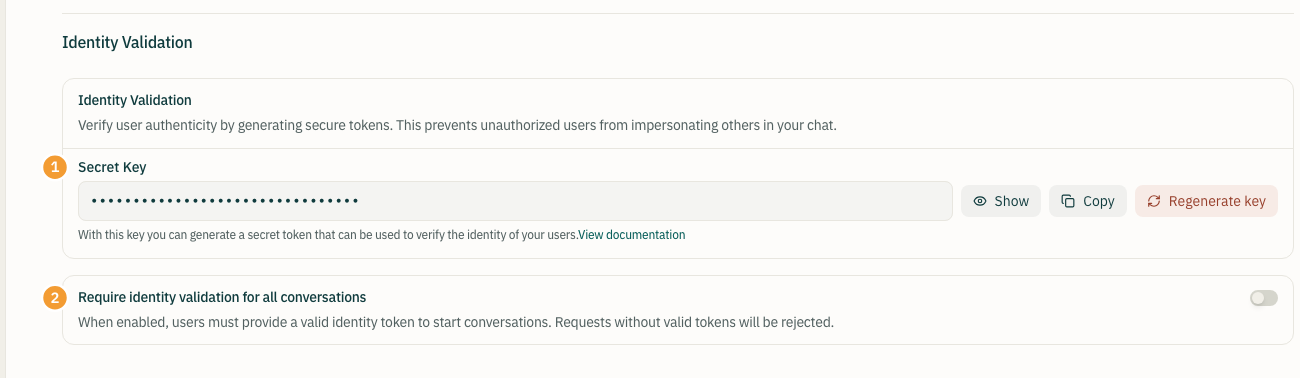
Note: never put the secret key in your page or in JavaScript the browser can see. Anyone with the key can pose as any customer.
Compute the token on your server
The token is called identifier_hash: the HMAC SHA256 of the customer's ID in your system (such as their account number), keyed with the secret key, in hex. In PHP:
$identifierHash = hash_hmac('sha256', (string) $customer->id, getenv('HADIR_IDENTITY_SECRET'));In Node.js:
const crypto = require('crypto');
const identifierHash = crypto
  .createHmac('sha256', process.env.HADIR_IDENTITY_SECRET)
  .update(String(customer.id))
  .digest('hex');
Pass the customer in the page
Once the chat is ready on the page, call setUser with the same ID you computed the token from:
window.addEventListener('hadir:ready', function () {
  window.$hadir.setUser('12345', {
    name: 'Customer name',
    email: 'customer@example.com',
    identifier_hash: 'the token your server computed'
  });
});- The object needs at least one of
name,emailoravatar_url. - When the customer signs out of your site, call
window.$hadir.reset()so their conversation does not stay visible to the next person on that device.
Require validation (optional)
Turn on Require identity validation for all conversations (2) once your site sends the token on every page. From then on, any attempt to identify a visitor without a valid identifier_hash is refused, so nobody can pose as another customer. Visitors who are not signed in can still start a conversation as anonymous visitors.
Regenerate the key
If you think the key has leaked, select Regenerate key, then Regenerate key again to confirm. The current key stops working immediately; update every site that uses it with the new key, or verification will fail.
Thanks for your feedback ✓
We got your note and will review the article with it in mind.