


Browse sections
Create your account and workspace
Sign up in a minute, confirm your email, and open your dashboard.
Hadir Chat starts with a 14-day trial, with no card and no commitment. You need an email address for the confirmation link; we then set up your workspace for you.
Create the account
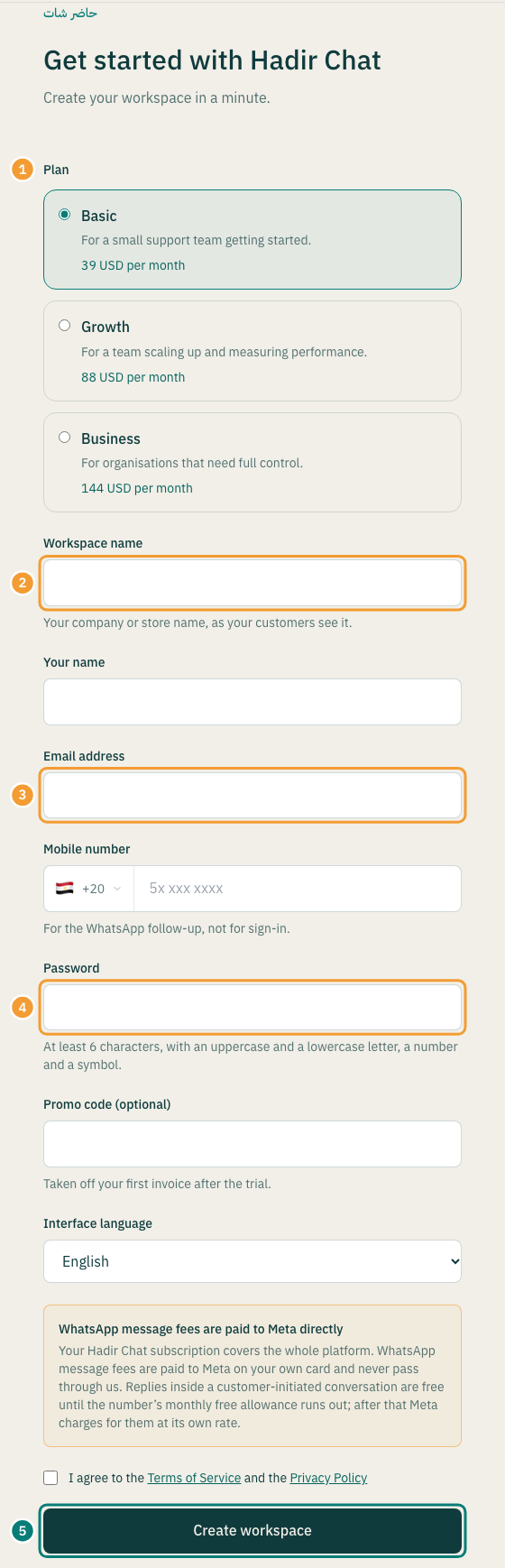
- Open the signup page and choose a Plan (1). Every plan starts with the same trial, and you can change plans later.
- Enter your Workspace name (2), as your customers know your business.
- Enter Your name and Email address (3). You sign in with this email, and the confirmation link goes to it.
- Enter your Mobile number. We use it to follow up on WhatsApp; it is not used to sign in.
- Choose a Password (4): at least 6 characters, with an uppercase and a lowercase letter, a number and a symbol.
- Pick the Interface language, and add a Promo code (optional) if you have one.
- Tick the box to agree to the Terms of Service and the Privacy Policy, then select Create workspace (5).
Confirm your email
- You see a page titled Check your email. Open your inbox and find the email “Confirm your Hadir Chat account”.
- Select Confirm email in that email.
- No email? Check your spam folder, or select Send the link again on the confirmation page.
Note: the confirmation link is valid for 24 hours. If you open it later, you see “This confirmation link has expired”. Select Send the link again on that page once, then open the newest email.
Wait while your workspace is set up
- After confirming, you see Setting up your workspace. Leave the page open; it usually takes a few seconds.
- When it says Your workspace is ready., select Open your dashboard.
- If it says “We could not finish setting up”, the problem is on our side and our team already knows. Select Try again.
Next
You land on the Overview page of your account, with a Getting started checklist. Select Open your inbox to go to your conversations without a second sign-in. We suggest adding your team first, then connecting your first channel.
Thanks for your feedback ✓
We got your note and will review the article with it in mind.